What could make Apple’s touch screen laptops great?
Apple recently released a new MacBook Pro with a touch display. It looks great, and the commentary on it seems to agree on one thing: it’s a bad idea, and Apple should’ve known better.
The two popular problems
One: Ergonomics. If you’re keeping up with Apple’s product releases, and maybe read or watch some commentary on them, you’ll inevitably have been shown part of what Steve Jobs had to say about touch screens on laptops. Here is his full explanation from 2010:
[…] You know the first thing you think about is this, right? We thought about this years ago. We've done tons of user-testing on this, and it turns out, it doesn't work. Touch surfaces don't want to be vertical. It gives great demos, but after a short period of time, you start to fatigue, and after an extended period of time, your arm wants to fall off. It doesn't work; it's ergonomically terrible. Touch surfaces want to be horizontal, hence pads for a notebook. That's why we've perfected our multi-touch trackpads over the years. […]
He was absolutely right in 2010, and human physiology hasn’t changed since. Touching a screen in front of you for more than a casual tap or flick is terrible and will cause you physical discomfort.
Two: Precision. We didn’t immediately convert all our devices from pointer (mouse or trackpad) to touch once the technology was ready, for more reasons than tired arms. We could have adapted the placement of our displays to be more ergonomically suited for touch. We didn’t because there was another, and far more important, reason to stick with the mouse or trackpad: Information density. With a pointer, we can achieve single-pixel-accuracy and click controls precisely. Compared to that, our fingers are huge. UI elements need to be bigger for touch compared to a pointer-optimized UI, reducing the amount of information that can be shown on screen.
For example, there are the close, minimize, and full-screen controls at the top of a window. It’s easy to hit them with a pointer, but when we touch the display, the computer doesn’t know which one we mean to trigger. Instead, it zooms in, and we have to tap again:
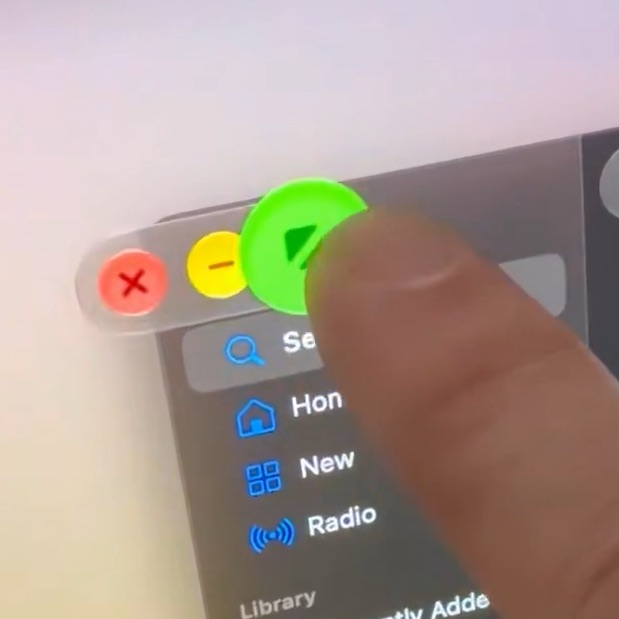
Frame taken from a video by Neil Cybart. No link, because it’s on X.
And our desktop operating systems are full of these kinds of issues. Ever since the graphical user interface became mainstream in the 90s, everything in it was built with the precision of a pointer in mind. Buttons are too small for touch, menus too fiddly, and… oh, wait, is that it? It’s just that controls are too small, and making them bigger for touch reduces information density on screen?
I mean, we keep our keyboards for editing text, and keyboard-shortcuts and -navigation. We retain a pointer for apps that don’t make sense to touch, but we get an additional input method, touch, and the UI is adapted only when touch is actually in use. Like it is when touching the traffic light to close a window. So, the downside is…?
If done right, I think this will be just fine. If done wrong, Apple will learn what Microsoft learned when they released Windows 8.
Can we make a case for touch?
Is there a case for touch on laptops? Don’t close the tab just yet, I thought about this. Let’s just think about what we do with laptops and desktops for a second, and how this connects to touch screens and stylus support.
➕ Intuitive UX—Touch was considered the future of everything for a while, before the iPhone. Since 2007, it is considered the status quo. Pre iPhone, people built multi-touch tables, yes, tables, not tablets, at home, and experimented with novel interaction concepts. There was even a TED Talk about multi-touch that demoed a multi-touch table in 2006! It is an appealing and intuitive concept. Instead of moving a mouse around on your desk, or dragging a finger over a trackpad to manipulate a cursor on screen, you just touch the screen. People who’ve never used a computer instinctively know how to interact with a touch-enabled device. Plus one for intuitive UX.
Some interactions are far easier when done using touch, rather than using a pointer. Apple has known this too, for years, just like it knew that people’s arms would fall off if held up in the air for too long. Apple’s solution: An amazing trackpad that is nothing like the flimsy pads most Windows and Linux laptops ship with.
➕ Ease of use—You get to use multiple fingers at once to use gestures like pinch to zoom, rotate images, swipe between desktops and apps, etc. All these gestures are great, and I wouldn’t want to miss them, but they’re not intuitive. People have to learn them, most people never do. Enabling direct manipulation of what is on screen makes these interactions a lot more intuitive. Reach out and pinch the timeline in iMovie to zoom out and show more of the movie. Flick a window to one edge of the screen to make it take up 50% on that side, and flick another to the other side, and you’ve got two side-by-side windows. Grab a photo in Photos and rotate it. Yes, all of those things are possible without touch, because we built crutches like keyboard shortcuts and trackpad-gestures, but they become far more accessible with touch. And yes, those crutches are optimized to be fast, faster than touch, but not all users are pro-users, and those users usually prefer comfort over speed. Plus one for ease of use.
Pencil Support
With the iPad, Apple eventually overcame its very warranted stylus-phobia. Imagine the iPhone had launched with one, yuck! And today, we get to draw, write, and sketch with an Apple Pencil that has amazing fidelity, supports hovering, and is a joy to use.
Touch-screen Macs currently don’t support Apple Pencil, and it makes sense given the form factor, but I think it’s a missed opportunity. Many professionals use graphics tablets all day long. Yes, to draw, but also control complex CAD software, manipulate simulations and animations, and annotate documents. These are activities that require a pen, not a finger. Yet the MacBook display is in a very awkward position to use a pen on it: It’s upright. And I think that is a huge error on Apple’s part.
Not all of the activities that require a pencil make sense on an iPad, some make sense to stay on a desktop operating system, especially one with proper user-management that isn’t locked to an App Store. And, despite Apple’s amazing advancements in chip design, an M-something Max chip in a laptop with a fan will always be far more powerful than whatever Apple can put into an iPad without a fan.
I believe Apple dropped the ball when they neglected to question how far their laptops should allow opening them up. Pencil support makes perfect sense in a laptop that folds at least 180° (flat), or even back on to itself, becoming a very fat, but also very powerful, tablet with a fan.
The solution
Apple has these great hardware engineers, they recently engineered an amazing new hinge for the iPhone Duo. I’m sure they could manage a great new hinge for the MacBook Pro with Touch, and add Pencil support while they’re at it. At the same time, I believe touch, for fingers, is more of a consumer-level feature. In a way, I feel like Apple rushed this, while being over two decades late to the party: The MacBook Air and Neo should have touch, the MacBook Pro should open 360° and support Apple Pencil.
And no, adding touch and stylus support with a 360°-hinge would not be innovative. The first time I held a laptop that opened all the way to become a tablet, I was 12, so that would have been around 2003. But I’m sure Apple could put its own spin on this and make it 1.000x better than what is currently available on the market. But with the current MacBook Pro with touch-display, they really dropped the ball.