Apple CarPlay on iOS 26 is worse than it was on iOS 18
Tomorrow, Apple will announce the iPhone 17, which will be, likely, released with iOS 26 pre-installed. Don’t waste your money, despite the hardware, which is probably going to be impressive, the experience will be worse than buying an iPhone 16 running iOS 18, and refusing the iOS 26 update when it becomes available.
I’ve been running the developer and later the public betas of iOS 26 and iPadOS 26 for over a month now, and it is bad. It truly is bad. In everyday life, iOS 26 brings exactly one improvement: the “Stop” and “Snooze” buttons for alarms are huge now and difficult to miss, even when half asleep. Otherwise, the UI takes up more space, labels on buttons are difficult to read, quick actions that used to be buttons have been moved into menus, and the photos and phone app require a master’s degree to navigate now. Not that the photos app on iOS 18 was better, but the phone app is truly abhorrent now.
But let’s get to the reason I’m contemplating going through the quite tedious and difficult process of downgrading my phone to iOS 18 before it's too late, and it becomes impossible: CarPlay is horrible now. Images speak louder than words, so here is a comparison of CarPlay. Both screenshots are from a VW Golf VII with Discover Pro, but on the same hardware, iOS 18 renders an image that is larger, crisper, and contains more useful information:
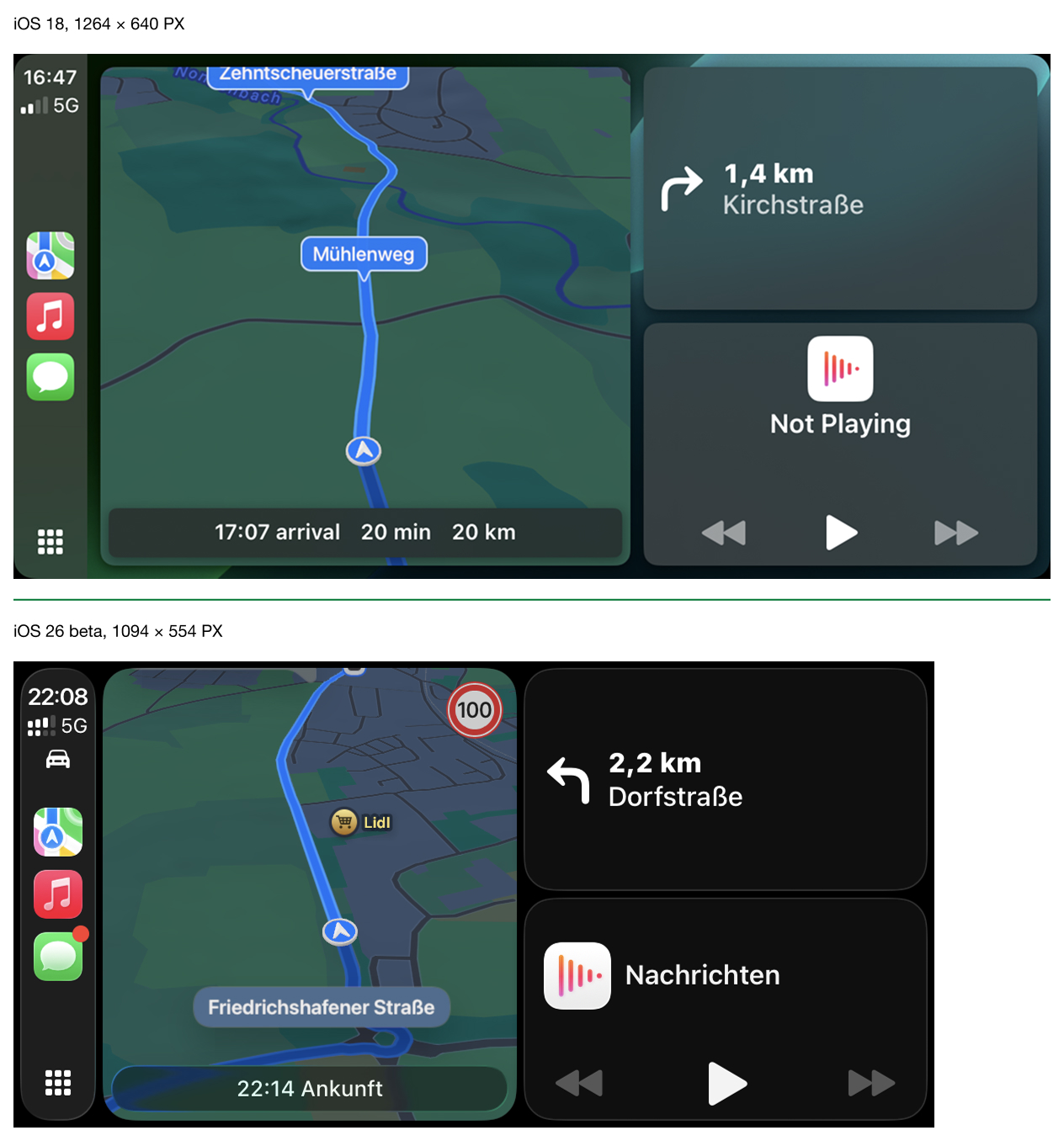
The smaller image, rendered by iOS 26 beta, gets upscaled by the car’s entertainment system to fill the screen, which makes it fuzzy and very information poor. One very annoying side effect of this is the lack of useful information overlaid on the map. Where iOS 18 shows arrival time, remaining travel time, and remaining travel distance, iOS 26 beta shows only the arrival time. Until now, I hadn’t realized how often I actually need to know the remaining travel time and distance, but it's quite often.
It might seem like a small thing, but I used to drive several hours in this tile-view quite happily. Now I tap the screen a few times an hour to enter the Maps app and look up how many kilometres and minutes of distance I have left to drive, before exiting into tile-view again so I can more easily control my music. Let me make this very plain: I used to touch my CarPlay once, when setting off, now I touch it frequently. This is a safety issue, and it wasn’t one with iOS 18.
Update, Feb 23, 2026: There is a way to disable the smart zoom, which causes the issue described above. With that disabled, there is a lot more screen-realestate available, because all UI-elements are significantly smaller. However, the result is CarPlay running at a resolution that makes it impossible (for me at least) to read road names quickly.